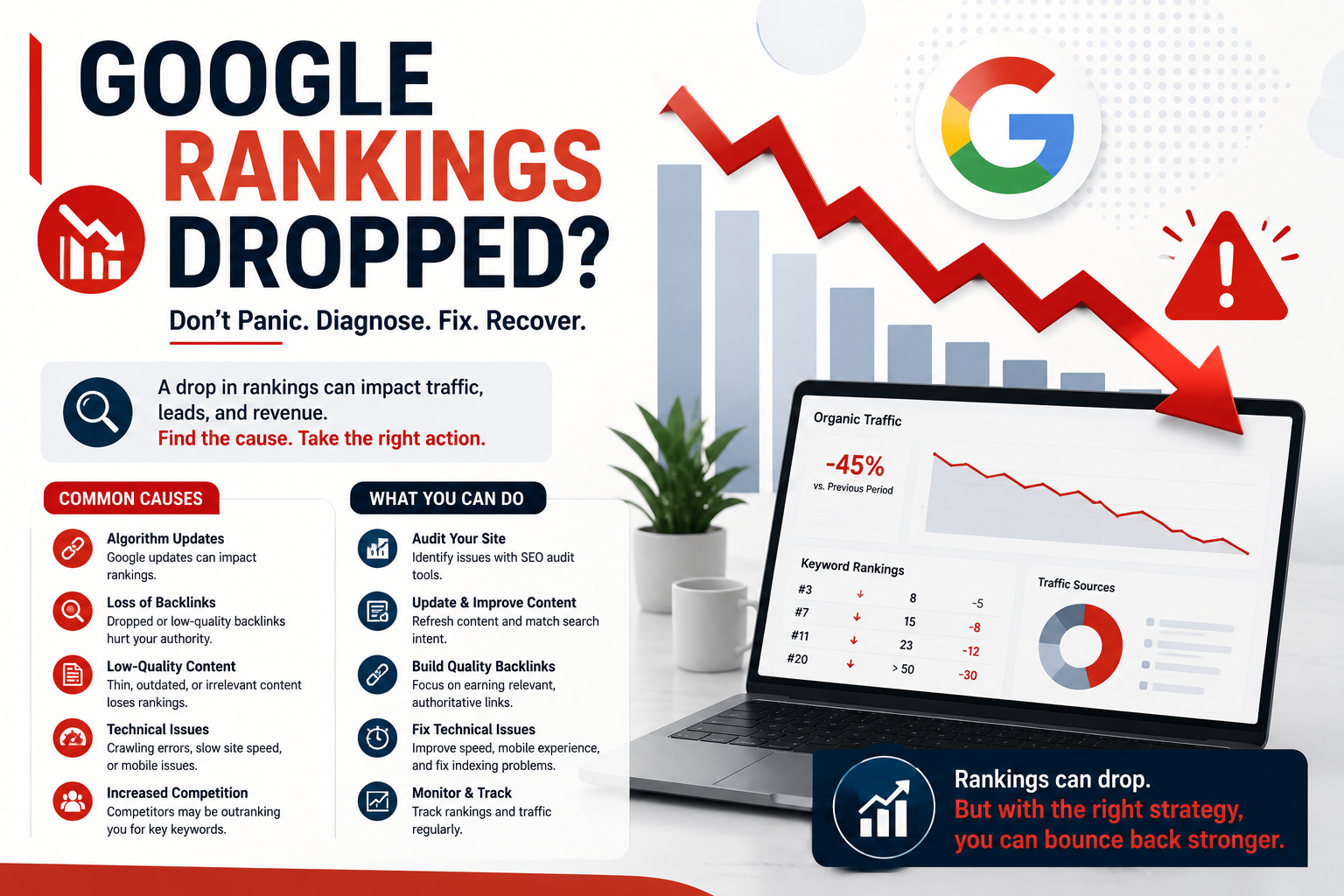
Waking up to discover your organic search traffic has plunged off a cliff is a unique brand of corporate horror. If your Google rankings dropped why fix them through frantic guessing when you can execute a precise diagnostic audit? In digital marketing and web design, panic is an expensive strategy. Whether you manage a high-growth B2B enterprise software platform or a local services site, a sudden drop in positions directly threatens your lead volume, customer pipeline, and bottom line. Before you fire your marketing team or rewrite every piece of copy on your site, you need to systematically diagnose the root cause of the decline.
Search engines operate on complex, interconnected systems comprising crawl budgets, indexing pipelines, rendering engines, and real-time machine learning evaluation models. When ranking drops occur, the culprit ranges from a misplaced directive in your robots file to a sweeping helpful content update or an unannounced URL restructuring. In this comprehensive guide, we will walk you through a step-by-step diagnostic workflow to help you figure out why your rankings fell and, more importantly, how to implement a bulletproof recovery roadmap.
Google Rankings Dropped: Why & How to Fix the Problem
To successfully resolve organic loss, you must understand that ranking drops fall into two fundamental categories: self-inflicted technical disasters and external ecosystem shifts. Treating an algorithmic update with technical site fixes is like changing your car’s spark plugs when you are simply out of gas. It wastes resources and delays genuine recovery.
When business owners ask why their Google rankings dropped and how to fix them, they often expect a single magic button. The truth is that search engine optimization requires analyzing data anomalies across Google Search Console (GSC), Google Analytics 4 (GA4), server access logs, and backlink monitoring tools. By approaching your traffic decline with the clinical precision of a senior system engineer, you can isolate variables, rule out false alarms, and take decisive corrective action.
Categorizing the Drop: Abrupt Shock vs. Gradual Decay
The speed and pattern of your traffic loss tell a compelling story about what went wrong:
- Vertical Cliff (24–48 Hours): A sudden, sharp decline where impression and click counts drop 50% to 90% overnight almost always points to severe technical failures, manual penalties, security breaches, or major tracking configuration blunders.
- Steep Step-Down (1–2 Weeks): A pronounced step-down in visibility coinciding with announced Search Core Updates, helpful content updates, or major spam rollouts usually signifies an algorithmic re-evaluation of content quality, site authority, or user engagement metrics.
- Gradual Erosion (3–12 Months): A slow, persistent slope downwards typically signals content decay, growing technical debt, emerging competitor dominance, or evolving user search intent that your site has failed to address.
Checking your metrics at 3 AM expecting mercy from an algorithm that has less empathy than a broken office printer will not restore your positions; only methodical isolation of data will. Let us dive into the multi-stage diagnostic process.

Step 1: Verify the Severity and Scope of the Organic Traffic Loss
Before launching a site-wide overhaul, you must confirm that a real drop actually occurred in search engines rather than inside your reporting tools. Data tracking breaks far more often than search algorithms do.
Disentangling Organic Drops from Tracking Disruption
Start by auditing your measurement setup. Did your tag management container fail during a recent code release? Was an analytics tracking snippet inadvertently stripped out by your frontend deployment pipeline? Verify your GA4 setup alongside your Google Search Console performance reports.
If Google Analytics shows zero traffic starting on a specific Tuesday but Google Search Console shows stable impressions and clicks over the exact same period, your site did not lose rankings—your analytics tag simply stopped firing. Resolving tracking issues before modifying content saves countless hours of wasted work. If you suspect your measurement setup or overall site architecture needs structural refinement, reviewing professional Web Development Services can help ensure clean deployment pipelines and resilient data collection.
Distinguishing Page-Level Drops from Site-Wide Penalties
Next, determine whether the decline affects your entire domain or a specific cluster of URLs. In Google Search Console, filter your performance data by comparing the 28-day period after the drop against the 28-day period prior:
- Query-Specific Losses: Did you lose positions for brand terms, high-intent transactional keywords, or top-of-funnel informational blog posts?
- Page-Level Isolations: Did traffic drop across all pages, or did a single high-performing blog post lose its featured snippet position to a competitor?
- Device or Country Discrepancies: Did mobile traffic plummet while desktop rankings remained unaffected? A mobile usability bug or poor responsive design can sink mobile positions overnight.
If your Google rankings dropped why fix the whole site when only three legacy blog posts lost their top positions due to outdated information? Pinpointing the exact boundary of the damage keeps your recovery efforts focused and cost-effective.

Step 2: Diagnosing Technical SEO & Crawlability Disasters
If your traffic loss exhibits a vertical cliff pattern, technical bugs are the prime suspects. Technical SEO issues prevent Googlebot from crawling, parsing, rendering, or indexing your pages efficiently.
Canonical Tags, Noindex Directives, and Robots.txt Blunders
An accidental `noindex` tag deployed by a frontend developer who clearly believed "out of sight, out of mind" applied to organic business revenue remains one of the most common causes of instant ranking annihilation. Check the following technical directives immediately:
- Meta Robots Directives: Inspect your template head tags. Ensure pages do not contain `` directives on production environments.
- Robots.txt Blockages: Review your `robots.txt` file. Ensure important directory paths (e.g., `/blog/` or `/services/`) were not accidentally blocked by disallow rules during a recent release.
- Canonical Self-Sabotage: Verify your self-referential canonical tags. If page A points its canonical tag to page B, or if canonicals point to HTTP non-secure URLs, Google will drop page A from index consideration. Much like trying to find a missing sock in a tumble dryer, tracing nested canonical loops requires patience and systematic verification.
Server Errors, Hosting Outages, and Core Web Vitals Surprises
Googlebot prioritizes crawl efficiency. If your web host experiences intermittent 5xx server errors or prolonged DNS latency, Googlebot will throttle its crawl rate and temporarily de-index pages to protect user experience. Check your server access logs and web hosting uptime records for 500, 502, 503, or 504 status spikes during the timeframe of the drop.
Additionally, review your site performance. A dramatic degradation in Core Web Vitals—specifically Interaction to Next Paint (INP) or Cumulative Layout Shift (CLS)—can push competitive pages down search engine results pages (SERPs). Partnering with dedicated SEO Services ensures that your technical infrastructure, crawl budget, and performance metrics are monitored continuously before minor technical debt turns into catastrophic ranking loss.

Step 3: Analyzing Google Algorithm Updates and Content Relevancy
If technical audits come back clean and your data infrastructure is functioning perfectly, your traffic loss likely stems from an algorithmic update or shifting competitive dynamics.
Algorithmic Adjustments vs. Manual Actions
First, rule out a Manual Action. Open Google Search Console, navigate to the Security & Manual Actions tab, and check for active security issues or manual penalties. A manual action means a human reviewer at Google flagged your site for link spam, scraped content, hidden text, or deceptive behavior. Manual actions require explicit remediation followed by a reconsideration request.
If Search Console displays "No issues detected," your decline is algorithmic. Google updates its search algorithms thousands of times per year, alongside major Core Updates every few months. Algorithmic updates arrive unannounced like unexpected in-laws on a Sunday morning, leaving unprepared webmasters scrambling to clean up lingering content clutter.
Content Decay, Intent Shift, and Competitor Breakthroughs
Search algorithms continuously evaluate E-E-A-T (Experience, Expertise, Authoritativeness, and Trustworthiness). When an update rolls out, Google is not necessarily "penalizing" your website; it may simply have found other pages that answer search queries more effectively.
Ask yourself these critical content questions:
- Has Search Intent Evolved? Did a query that used to favor text-heavy blog posts shift toward interactive calculators, product comparison tables, or video walkthroughs?
- Is Content Outdated? Competing against modern, regularly updated resources while your page still celebrates a 2018 design aesthetic is a guaranteed path to ranking erosion.
- Did User Experience Standards Move? If your content is buried beneath intrusive pop-ups, poor font hierarchy, or confusing layout structures, users will bounce back to SERPs, signaling poor satisfaction to search algorithms. Upgrading your visual framework through targeted UI/UX Design Services can dramatically improve user retention metrics and signals sent back to search engines.
Comprehensive Diagnostic Matrix: Causes, Signals, and Remediation
To streamline your recovery strategy when your Google rankings dropped why fix decisions must be matched with exact root causes. Use the comparison matrix below to diagnose your specific issue and initiate the correct remediation protocol.
| Possible Drop Cause | Diagnostic Signals & Patterns | Timeframe to Impact | Recommended Action Plan |
|---|---|---|---|
| Technical Indexing Block (Noindex / Robots.txt) | Abrupt 80%+ drop in GSC impressions; pages marked "Excluded" or "De-indexed". | Immediate (24–48 hours) | Remove restrictive directives, update robots.txt, resubmit XML sitemaps via GSC. |
| Google Core Algorithm Update | Site-wide step-down across category pages during official rollout announcement window. | 1 to 2 Weeks | Audit E-E-A-T, improve content depth, remove thin pages, enhance user experience. |
| Unintended URL Migration / Broken Redirects | 404 error spikes in GSC; loss of historical page authority on redesigned URLs. | 3 to 7 Days | Map and implement 301 redirects from old URL paths to corresponding new endpoints. |
| Competitor Content Overhaul & Backlink Aggression | Gradual loss of rank 1–3 positions on specific high-value commercial keywords. | 1 to 3 Months | Update content facts, expand media assets, execute digital PR & link acquisition. |
| Manual Security Action (Hacked / Malware) | Security warning flag in GSC; organic search snippets display "This site may be hacked". | Immediate | Clean malicious scripts, patch server vulnerabilities, request security review. |
How to Recover Dropped Google Rankings: Actionable Step-by-Step Recovery Roadmap
Once you have diagnosed the root cause behind your ranking drop, execute this prioritized recovery protocol. Relying solely on optimism for SEO recovery is about as effective as using a floppy disk for cloud backup; success requires methodical execution.
Step 1: Fix Technical Liabilities Immediately
Resolve crawl blocks, canonical errors, 404 responses, and schema markup errors. Ensure your XML sitemap is clean, updated, and re-submitted to Search Console. If your site recently underwent a redesign or hosting migration, verify that every historical URL has a clean 301 redirect pointing to its exact modern equivalent.
Step 2: Refresh, Consolidate, and Elevate Content
Conduct a content quality audit across your site architecture. For pages that dropped due to algorithmic updates:
- Prune or Merge Thin Pages: Combine multiple short, overlapping blog posts into one comprehensive, high-authority master resource. Redirect old URLs to the consolidated guide.
- Demonstrate True Expertise: Add original data, unique industry commentary, quotes from subject matter experts, and custom visual diagrams. Eliminate generic AI-generated filler text that offers zero unique value.
- Optimize for Search Intent: Re-examine top-ranking competitors for your primary keywords. Match or exceed their formatting depth, user tools, structural clarity, and media engagement.
Step 3: Reinforce Domain Authority and User Signals
Organic search performance does not exist in a vacuum. Rebuilding lost rankings often requires strengthening your domain’s off-page footprint and overall user experience metrics:
- Audit Your Link Profile: Check for toxic backlink spikes caused by negative SEO campaigns or low-quality link schemes. Use disallow tools judiciously if spam attacks coincide with your drop.
- Enhance Internal Linking: Pass page rank from high-authority pages across your site to recovering pages using descriptive, keyword-relevant anchor text.
- Refine Brand Architecture: Ensure your core corporate pages—from your company history to your service offerings—clearly display trust signals, contact details, author bios, and verified business credentials. Navigating back to your primary digital storefront at Home should present a cohesive, highly professional brand narrative that instills immediate confidence in visitors and search evaluators alike.
Frequently Asked Questions
1. How long does it take to recover after Google rankings dropped?
Recovery timelines depend entirely on the underlying cause. Technical fixes (such as removing a misplaced `noindex` tag or resolving server downtime) can restore rankings within a few days to two weeks as Google re-crawls your site. Algorithmic recoveries, however, typically require content overhauls and authority building, often taking 2 to 4 months—frequently requiring the next major Google Core Update cycle to fully reflect your improvements.
2. How do I know if my website suffered an algorithmic penalty versus a technical bug?
Check Google Search Console first. If you have a manual penalty or security issue, it will explicitly appear under the "Security & Manual Actions" tab. If that section is clean, compare your traffic loss timeline against official Google Search Status Dashboard announcements. A sharp, overnight drop across unrelated pages without an announced update usually signals a technical bug, whereas a steady drop coinciding with an announced core update indicates an algorithmic re-evaluation.
3. Will changing my website design or web host cause my Google rankings to drop?
Site redesigns and server migrations can temporarily affect rankings, but severe or permanent drops are avoidable. Permanent ranking loss occurs when URL structures change without proper 301 redirects, when page metadata is altered unintentionally, or when the new design introduces slow page load times and broken mobile layouts. Proper pre-launch planning and post-launch technical audits prevent these migration pitfalls.
4. Should I disavow backlinks if my rankings drop after a spam update?
Google's modern algorithms (including SpamBrain) are highly effective at automatically ignoring spammy or low-quality backlinks without penalizing your domain. You should only use the Google Disavow Tool if you have an active Manual Action for unnatural links or if you engaged in aggressive, low-quality link-building campaigns in the past that you cannot manually remove.
Ready to Recover Your Organic Traffic and Dominate Search Rankings?
Don't let technical bugs or algorithm updates disrupt your revenue pipeline. Get a comprehensive, expert audit of your website's search performance from the senior engineers and strategists at Devtaastic.